 INCEPTIVA
Explore Studio
Locate the main areas of the platform and learn where to perform each task.
Updated August 3, 2026 · 5 minMain navigation
Studio organizes features into Platform and Administration.
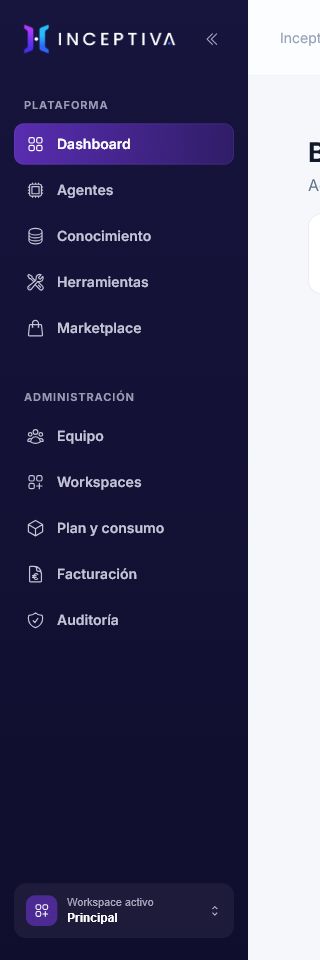
Under Platform, you will find:
- Dashboard: activity, usage, and operational status overview.
- Agents: creation, configuration, testing, and publishing channels.
- Knowledge: knowledge bases, documents, and external connectors.
- Tools: actions you can authorize for agents.
- Marketplace: catalog of available integrations and resources.
Under Administration, you will find:
- Team: members, roles, and access.
- Workspaces: the organization's workspaces.
- Plan and usage: limits and usage for the current period.
- Billing: billing management and available documents.
- Audit: relevant organization changes and events.
Dashboard
The Dashboard summarizes agents, knowledge bases, conversations, documents, and tools. It also shows usage, recent activity, integration status, and notices that require attention.
Use it for context; make changes from the relevant product area.
Search and notifications
The top search helps you find agents, knowledge bases, and tools. Notifications report completed processes, indexing errors, and other operational events.
Workspace selector
The selector at the bottom of the navigation shows the active workspace. Check it whenever a resource you expected to see is missing.
On smaller devices
On mobile and narrow screens, open the navigation from the header button. The content and actions are the same, although some panels appear vertically.